Me: Alexa, turn on bedroom lights.
Alexa: There are two services with the name bedroom
Me: Alexa, turn on bedroom lights
Alexa: Error Sound
Me: Alexa, turn on bedroom lights.
Alexa: I can’t find a device by that name
Me: Forget it, I’ll just use my phone
Has this ever happened to you? The technology powering smart speakers is powerful and sophisticated but application design is, relatively speaking, in the dark ages. Voice design requires a different understanding of how language and conversation influence our thinking and pattern our expectations.
Users aren’t patient and in a survey about 57% of users were willing to give a device the college try (3-4 interactions) but no one was interested in going back and forth more than 4 times. Voice interaction competes with physical objects such as light switches or thermostats so voice design requires that we value our end users time and attention. This isn’t an easy task since you are working against thousands of years of conversational and contextual expectations, a conversation is an intimate experience and your customer is going to be discerning.
If you want to create the best voice experience, use the following best practices:
- Focus on the task level – When designing for voice focus on accomplishing a specific task rather than creating an experience. If you try to create an experience, it is likely that your user will lose interest after 20 seconds or so because the experience creates friction for a task oriented user.
- Edit your script -As a rule of thumb your script will need half the words you think it does. Amazon describes it best in their documentation for Alexa Skills Kit (ASK).
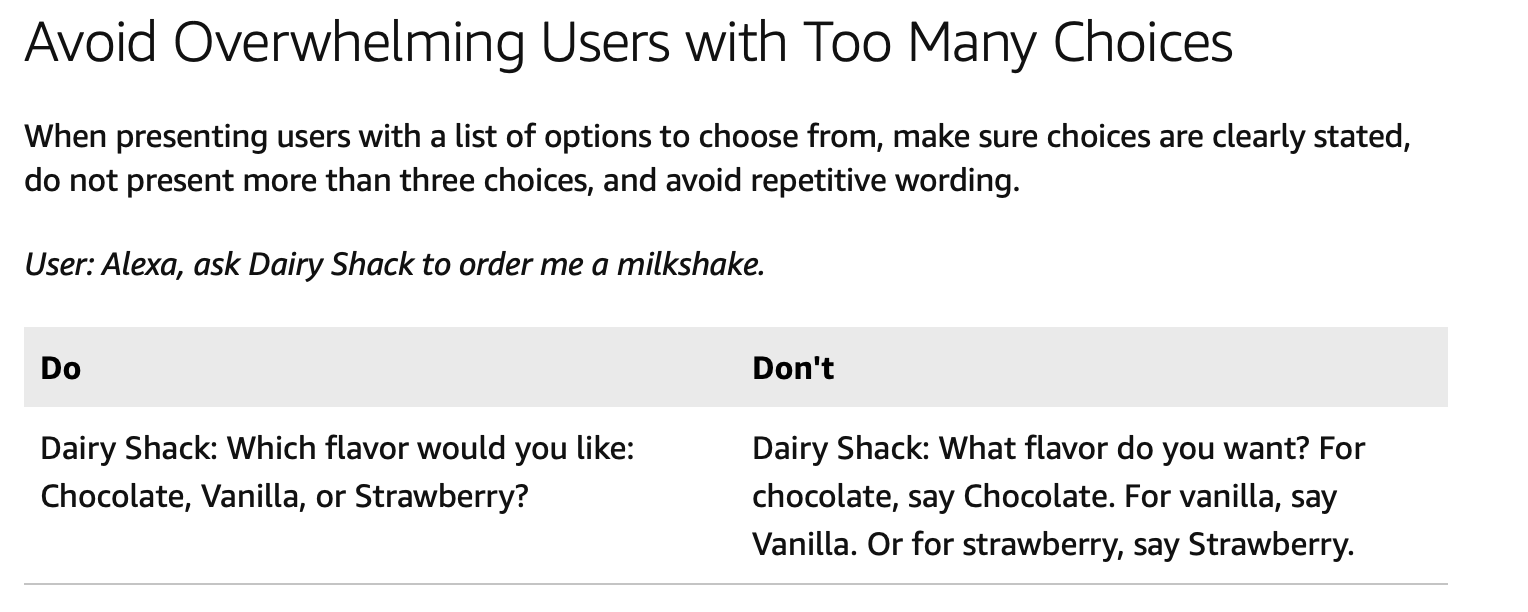
- Assume errors – Algorithms are, by definition, deterministic so there will always be some sort of issue or error that will come up with edge cases. It could be due to crosstalk (smart speakers struggle to identify which speaker is which without training) or ambient background noise. No matter what the cause, users don’t care (and they hate being labeled an edge case) so when you design for a voice experience, consider edge cases or errors because while they won’t happen often, they will stick in the end user’s memory. The timers on my Alexa work 80% of the time, but me and my wife still complain that the “timers never work”.
- Device set up should be easy -If a user has to configure everything using an app on the phone, what is the point of voice control? A voice app that provides a frictionless experience makes a lot of assumptions about the user rather than making them put in the effort to need to learn about the device and how to configure it. The model for this should be the iPhone, which is so intuitive that a child can pick it up and manipulate the device.
Who is doing it right? Radio apps on your smart speaker because 1) They are able to execute a specific task such as “Alexa, play NPR” 2) They able to accomplish the task within 1-2 interactions and 3) They take advantage of an interaction pattern that is familiar to us (listening to the radio, and maybe yelling at it…). These three components create a good experience for your customer and, when paired with the 4 design principles provide a robust blueprint for you to design for voice to surprise and delight your customers. and they are able to execute on the request with only 1-2 interactions (depending on background noise and other factors).
In my next post I will outline a case study of a lesson learned the hard way for bad voice design and the wrong application as well as diving into the different parts of the technology in order to show what is mostly mature and what has the most opportunity for improvement.
 Please Think Responsibly